A Collaborative Approach to Enterprise SharePoint Design for 9 Government Agencies and 35,000 users.
Enterprise UX design, unlike consumer UX, is about improving productivity and fostering collaboration within organisations.
To make this work, we need to understand how businesses run, look at current processes, and understand how employees use the system and make improvements based on their needs. But it's not just about tech or design skills - we also need to know how organisations tick and how to manage change and adoption. End of the day, success comes when the enterprise system becomes an enabler - improving productivity, fostering collaboration, and increasing engagement across the organisation.
In this case study, we'll show how we brought enterprise UX design to 9 different government agencies under the Ministry of Home Affairs to share a common enterprise system that can enable configuration to suit their unique needs, a system that works for everyone.
- We implemented a funnel-based UX process model that incorporated design thinking principles through collaborative workshops.
- We also leveraged DesignOps to streamline collaboration between our designers, product owners, and developers in achieving project objectives.
As UX team lead, I ran the research, led workshops, and worked with our product team to understand what users needed. Here's what I did:
- Got everyone involved and kept them engaged
- Made sure our designs worked with our tech limits
- Helped different groups agree on decisions
- Led step-by-step design changes to make adoption easier
A collective UX strategy through design thinking ensures everyone works together effectively.
These agencies are part of the same ministry, but each one has its own way of working. Each agency has different needs and goals. This makes it tricky to build one system for everyone. We therefore adopted a design thinking framework with a funnel approach, which guided our design activities through four stages: Exploratory, Strategic, Tactical, and Validation.
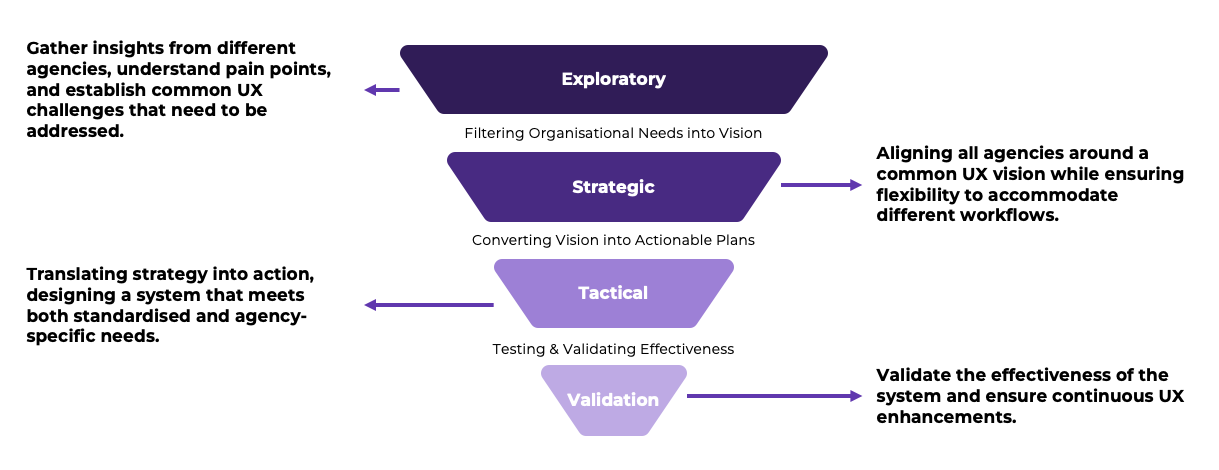
A funnel approach that gradually refined ideas to ensure:
- Design decisions are aligned across agencies at every stage.
- Collaboration touchpoints are established to ensure design decisions are made collaboratively with stakeholders.
- UX activities are organised to strategically structure research, analysis, design, and validation.
- A logical progression ensures research insights translate into actionable strategy, implementation, and continuous refinement.
We adopted an Agile UX approach that broke down the design discovery into bite-sized pieces while running in parallel with development.
Regular design sprints with stakeholders ran for the first 3 months. These sprints ran parallel to development iterations, allowing design work to be distributed across sprints while maintaining a dynamic environment where agencies participated in shaping the system through bi-weekly demonstrations and feedback.
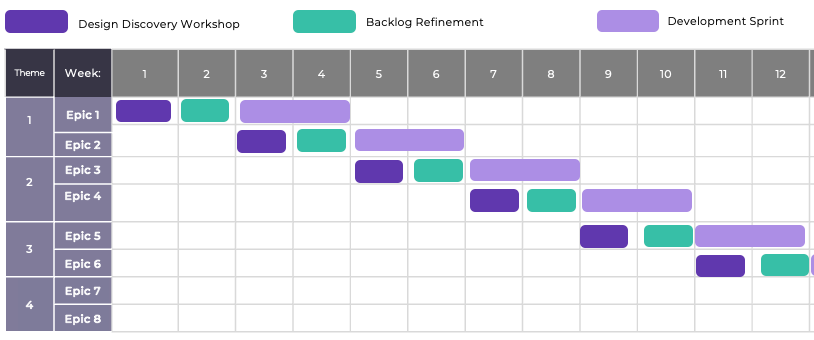
Impact: The synchronised sprint model allowed quick validation and alignment between agencies. Stakeholders actively shaped how the system evolved by participating directly and providing ongoing feedback.
Setting up the Discovery Squad to being diverse expertise together.
The Discovery Squad featured a flexible composition, with Subject Matter Experts (SMEs) rotating based on the current epic, ensuring relevant expertise for each phase.
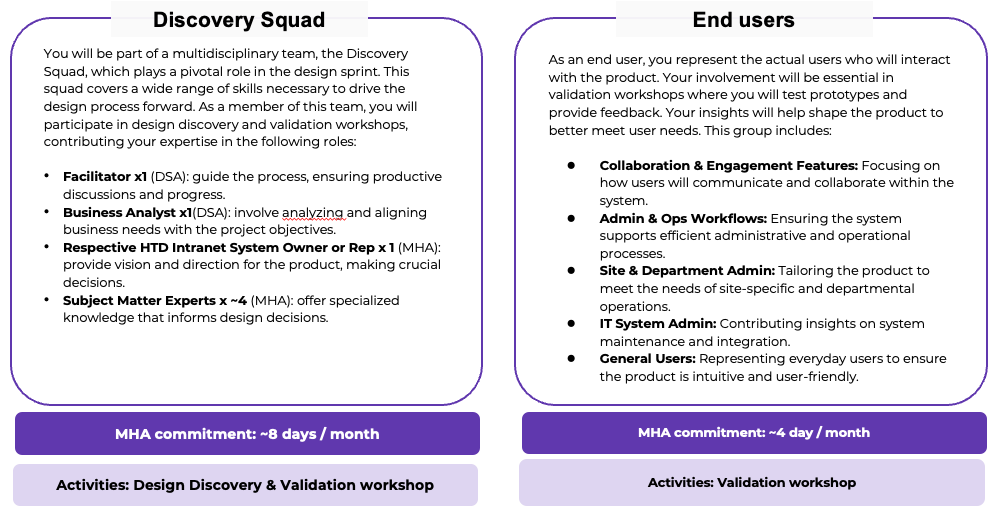
The core team consisted of SharePoint technical leads to ensure design decisions are technically feasible, business analysts for process mapping, UX designers for user-centered solutions, System Champions that represent each agencies, and SMEs with business domain knowledge.
Agency representatives joined as SMEs when their expertise was needed, providing valuable domain knowledge and validation.
This structure allowed the Discovery Squad to operate efficiently by ensuring:
- Strategic stakeholder engagement throughout key project phases
- SMEs from technology, business, and UX collaborate to ideate and ensure ideas are feasible, desirable, and viable.
- Design decisions are made collaboratively with real-world value.
Challenge 1: Breaking down silos between agencies.
The biggest challenge in an enterprise-wide transformation is misalignment. Each agency had its own workflows, intranet priorities, and usability pain points. Some teams struggled with document discoverability, while others found their collaboration tools inefficient. Agencies operated in silos, making cross-agency standardisation difficult.
Product envisioning sessions helped get everyone on the same page before jumping into design work.
Before jumping into design, together with my team, I ran a Product Envisioning Workshop to align all 9 agencies on a shared vision for the intranet. With different priorities and expectations, the biggest challenge was getting everyone to agree on what success looked like—without getting lost in feature requests.
Workshop Focus Areas:
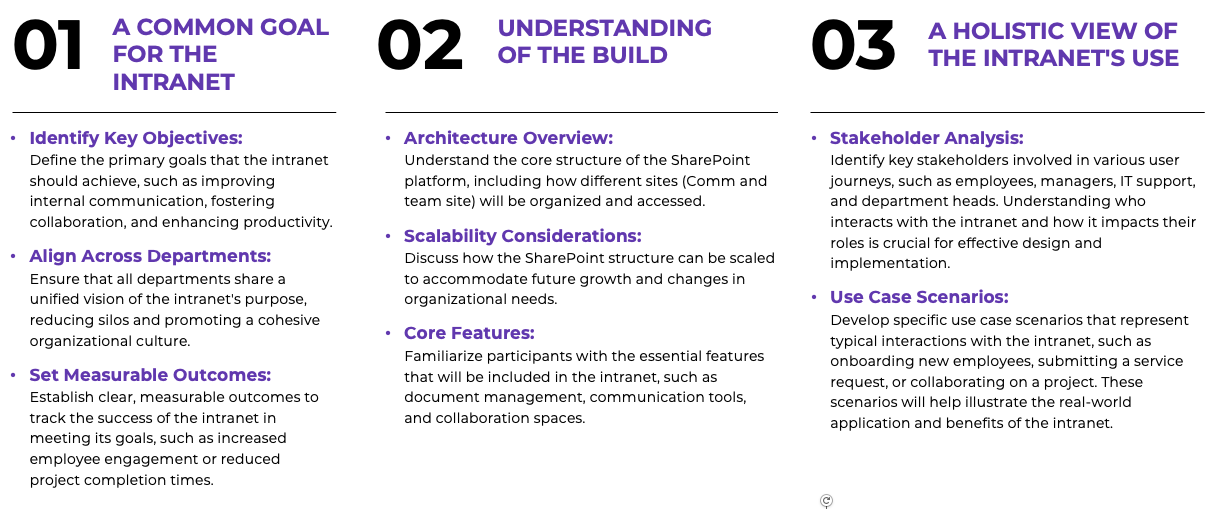
How We Did It:
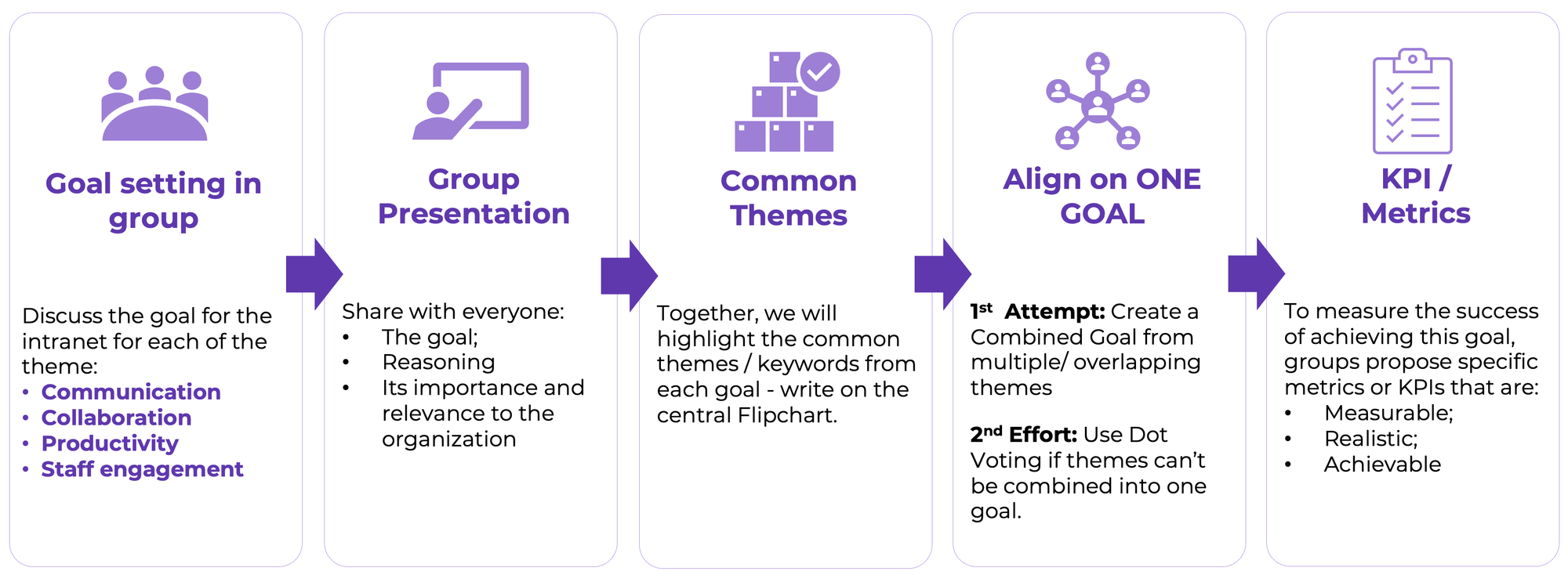
To facilitate goal setting, I worked with my team to create a step-by-step process to achieve our desired workshop outcomes. Here are the steps we used in the workshop.
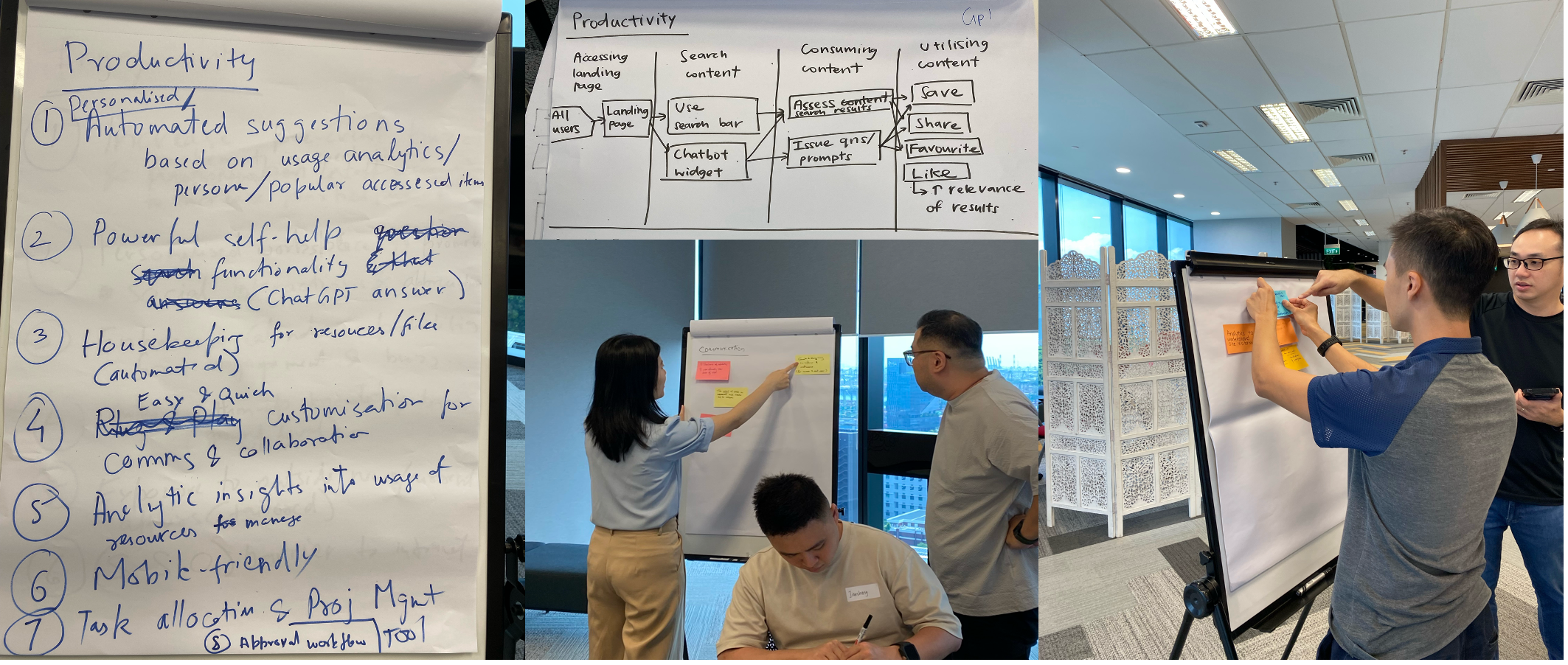
Other than the goal setting we also do hands-on exercises, we mapped user journeys, identified key features, and documented use cases for each theme. Interactive discussions and Q&A sessions helped build a shared understanding across all agencies.
The workshop was a success. Everyone agreed on what we wanted to build. We left with three big wins: we all shared the same vision, knew which features to build first, and had support from every agency. This shared understanding helped us stay on track as we designed and built the system.
Finding Common Ground Through Pulse Surveys.
Getting feedback from government employees isn't easy. They're busy people. So I kept our survey short and simple.
I focused on what mattered most - how they work day to day. No fancy words. No complex questions. Just the basics of what works and what doesn't.
My goal? Get honest answers about their biggest problems. That way, we could fix what really needed fixing.
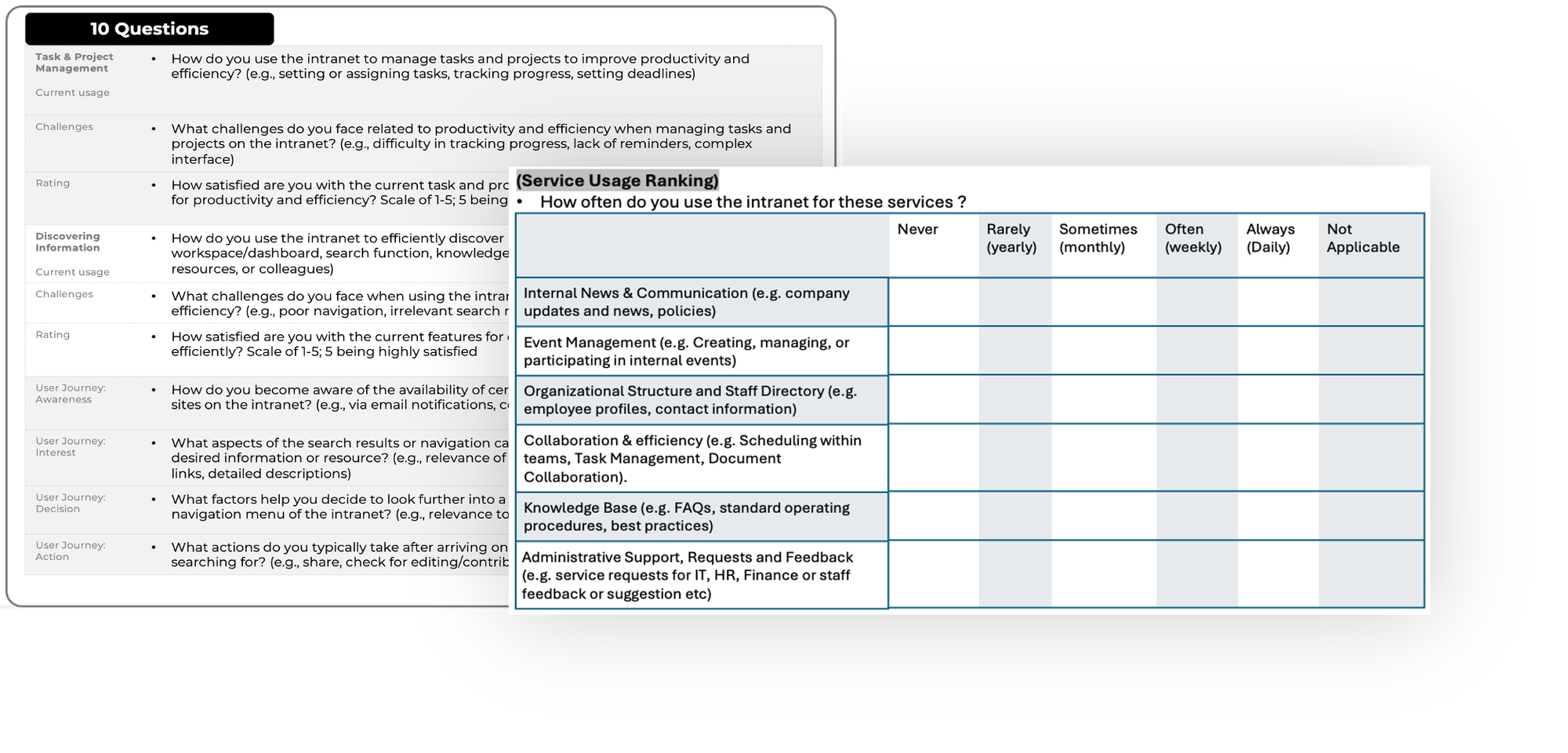
Based on our envisioning workshop goals, the survey focused on three key themes: Communication & Engagement, Collaboration, and Productivity & Efficiency.
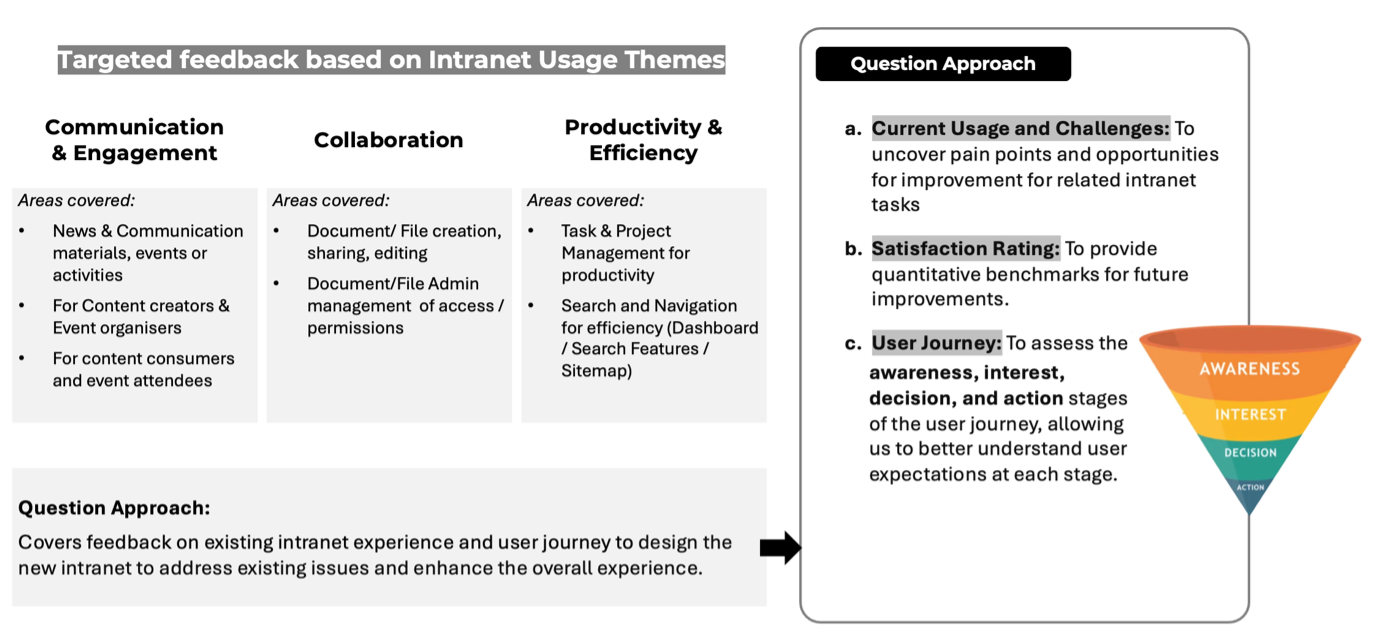
For each theme, we identified specific focus areas and metrics. The survey was designed to capture three critical aspects: current feature utilisation, user satisfaction metrics, and pain points in the user journey. This targeted approach ensured we gathered actionable insights while respecting participants' time constraints.
Through iterative refinement, we developed a streamlined questionnaire where each question served a clear purpose.
Our key objectives were:
- Identify key UX pain points in intranet usage
- Uncover common themes across different agencies
- Assess user sentiment toward the existing system
- Establish quantitative benchmarks for future improvements
The result
Challenge 3: Designing a unified yet flexible system.
A series of Design Discovery workshop to ideate a solution that works for everyone.
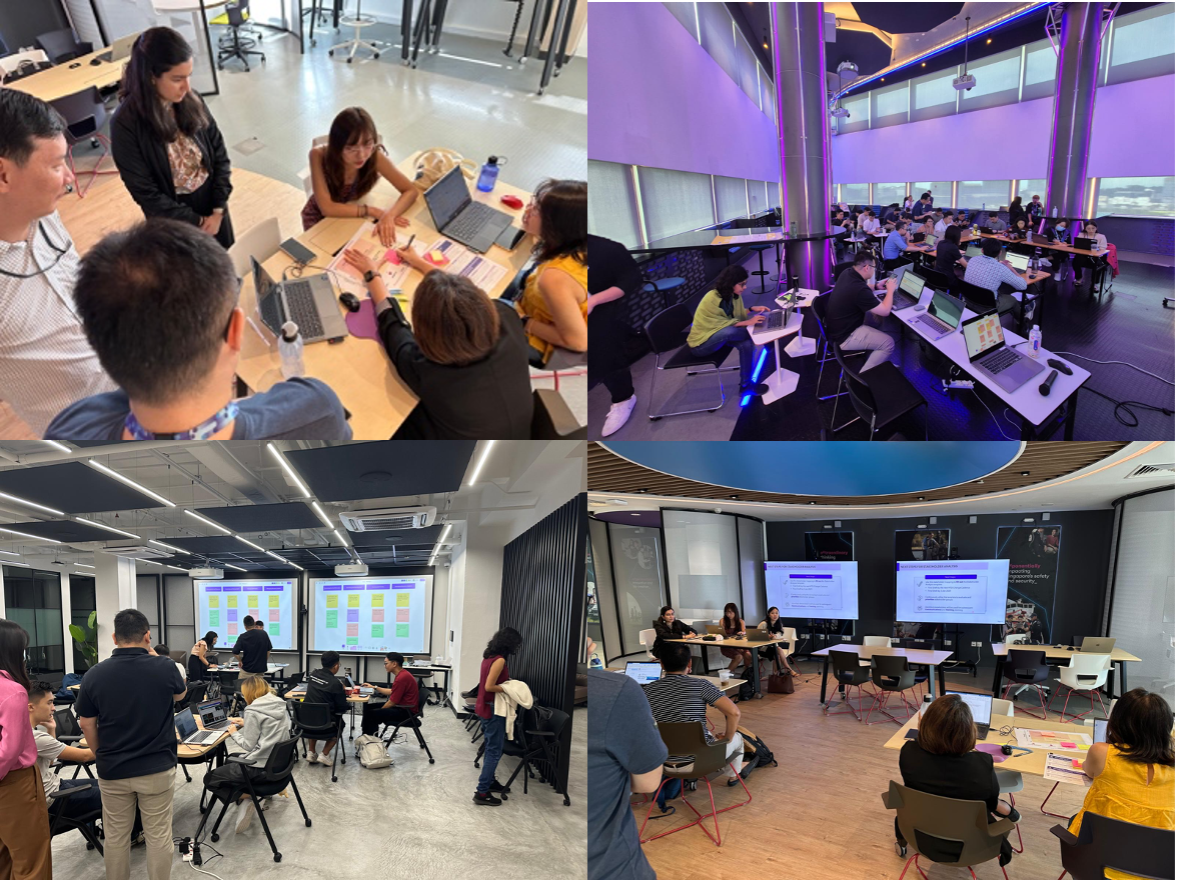
As I guided and facilitated the workshop with stakeholders through user story mapping exercises, agency representatives mapped their unique requirements onto our established user journey framework. This methodical approach helped surface shared requirements while preserving essential agency-specific workflows, ultimately leading to a set of core features that accommodated all users.
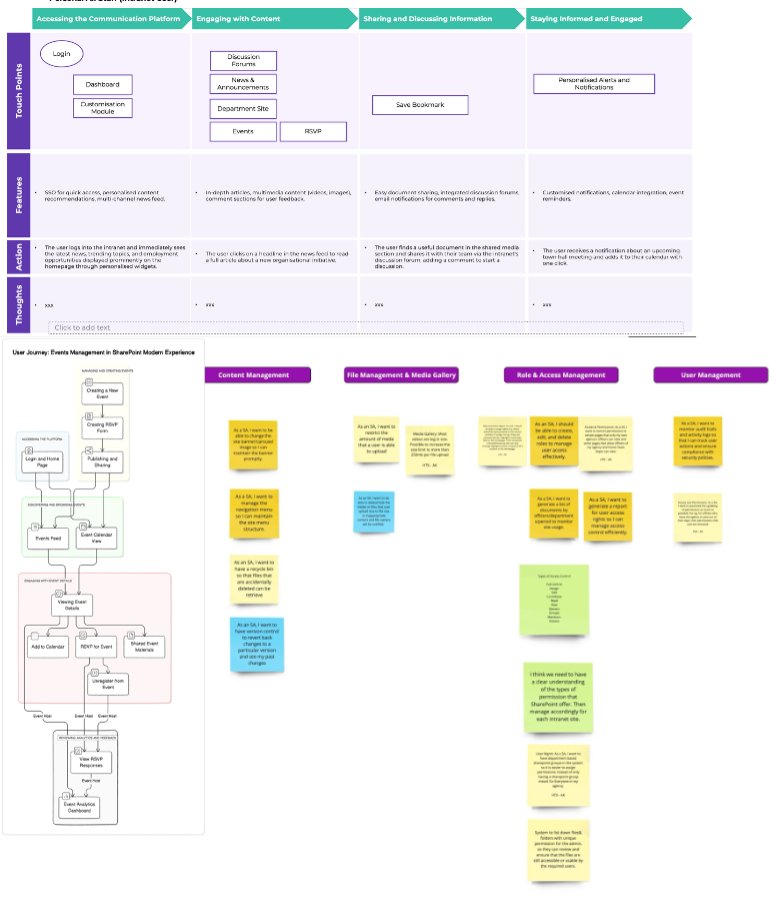
Throughout the five discovery sessions, this collaborative approach helped establish my leadership as a facilitator and earn stakeholders' trust. By sharing relevant insights from my past projects, I built credibility and fostered an environment of mutual learning.
These five full days together strengthened our relationships. The stakeholders' trust proved invaluable when working with the product team, as my deep understanding of stakeholder needs enhanced my influence throughout the project lifecycle.
Challenge 4: Ensuring UX decisions were viable, desirable and feasible.
One of the most complex parts of enterprise UX is ensuring that design solutions align with technical constraints. While UX teams advocate for seamless user experiences; technical limitations, security policies, and infrastructure constraints can pose challenges.
For example:
- Security compliance required certain restrictions on file sharing.
- Legacy integrations meant certain workflows couldn’t be automated immediately.
- Data migration complexities made some UX improvements difficult to implement.
Bringing Tech and Product Teams together through BXT.
Instead of treating tech teams as a barrier, we fostered collaboration:
✔ Established bi-weekly backlog grooming sessions with tech leads and product team.
✔ Assessed each feature request using the BXT framework:
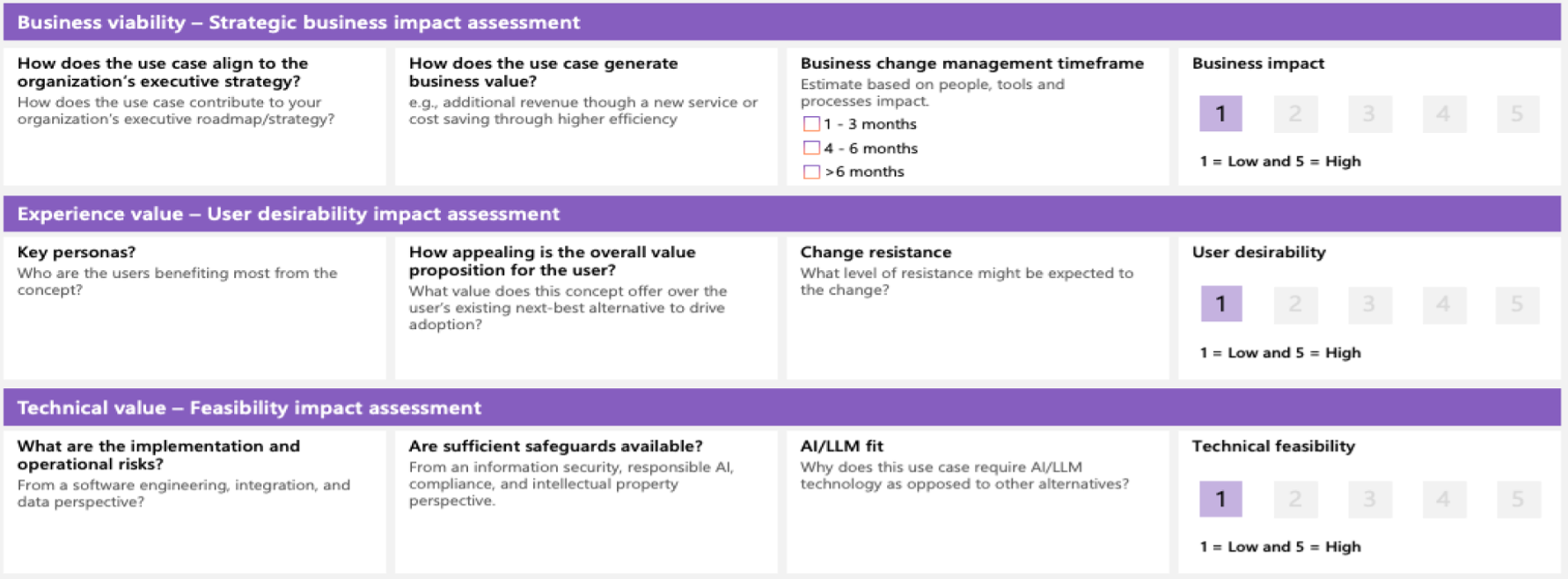
- Business viability: Does this bring measurable value?
- User desirability: Does it solve a real user problem?
- Technical feasibility: Can it be implemented within system constraints?
By embedding design and tech teams in a shared decision-making process, we proactively addressed constraints before development began, preventing last-minute redesigns and costly rework.
Embedding UX Decisions into the Product Backlog.
First, I worked with stakeholders to refine our ideas. Then, I teamed up with Business Analysis to run backlog grooming sessions. I shared real user feedback and data to help us decide what to build first. This helped us make smart choices about which features to work on.
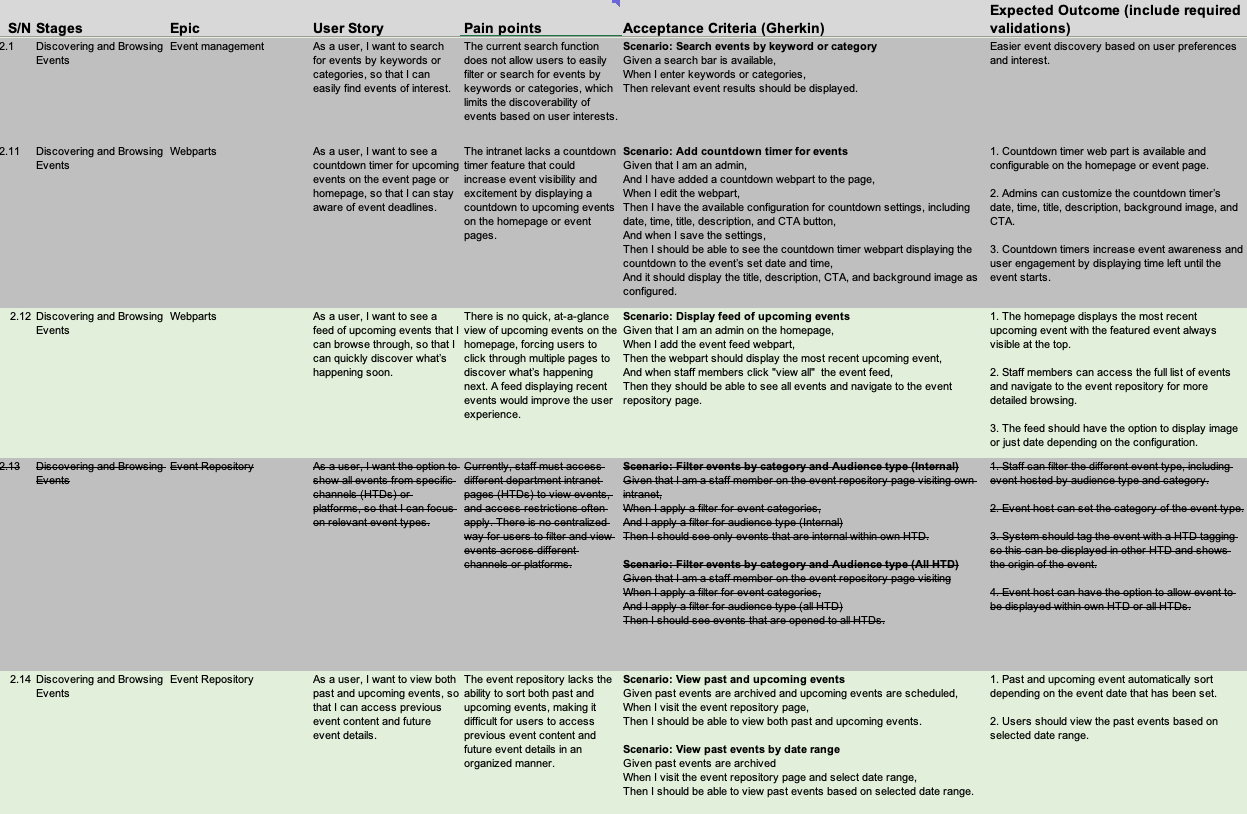
1. Mapping UX Insights to Backlog Items
Each product backlog item was directly mapped to specific user pain points identified during design discovery workshops. This provided:
✅ A clear rationale for why each feature was being developed.
✅ A traceable link between user needs and technical implementation.
✅ Stronger alignment with stakeholders, ensuring their concerns were addressed.
2. Advocating for UX in Backlog Grooming Sessions
During backlog grooming, I worked closely with the Business Analysis team to refine features based on real user data. By presenting concrete research findings and usability testing insights, I ensured that:
✔ High-impact pain points were prioritised in the sprint backlog.
✔ UX recommendations were grounded in evidence, not assumptions.
✔ Trade-offs were made strategically, balancing technical feasibility with user value.
3. Bridging the Gap Between UX and Technical Constraints
When technical limitations required modifications to UX recommendations, I played the role of mediator—helping teams:
✅ Find alternative solutions that still improved usability.
✅ Ensure UX integrity wasn’t compromised by technical workarounds.
✅ Facilitate discussions where both developers and designers co-owned decisions.
By integrating UX into backlog refinement, we transformed design decisions from abstract concepts into actionable, buildable, and testable solutions—ensuring that the final product aligned with both user expectations and system capabilities.
Challenge 5: Validating a system that works for everyone.
To maintain stakeholder alignment at key milestones, we established two critical feedback channels:
- Usability Testing: Throughout the design sprint, we created interactive prototypes enabling users to experience end-to-end workflows across various scenarios, gathering feedback and measurable scores.
- Sprint Reviews & Feature Demos: We presented developed features for feedback every two weeks, maintaining continuous alignment throughout the sprint.
Conducting usability tests to evaluate design effectiveness.
I led the creation of the usability testing. Working with the team, we developed interactive prototypes in Figma, crafted detailed test scripts, and established clear testing protocols. We strategically timed our testing phase to coincide with the completion of core features, allowing for meaningful evaluation.
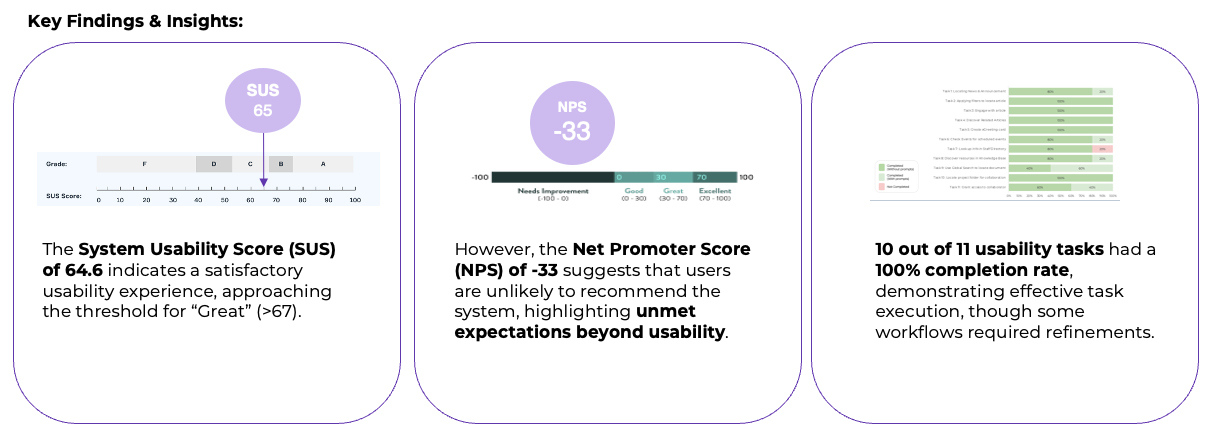
The testing results revealed that the prototype demonstrated strong functionality and user acceptance, achieving high task completion metrics. However, we received a lower than expected NPS score, primarily attributed to SCDF stakeholders seeking external content integration - a feature outside our current implementation scope.
A valuable insight emerged regarding our testing methodology: the importance of implementing a more structured testing environment. We observed that participant bias influenced some scoring outcomes. The product team has documented this learning to enhance the objectivity of future usability testing sessions.
Sprint reviews and feature demos act as vital alignment checkpoints.
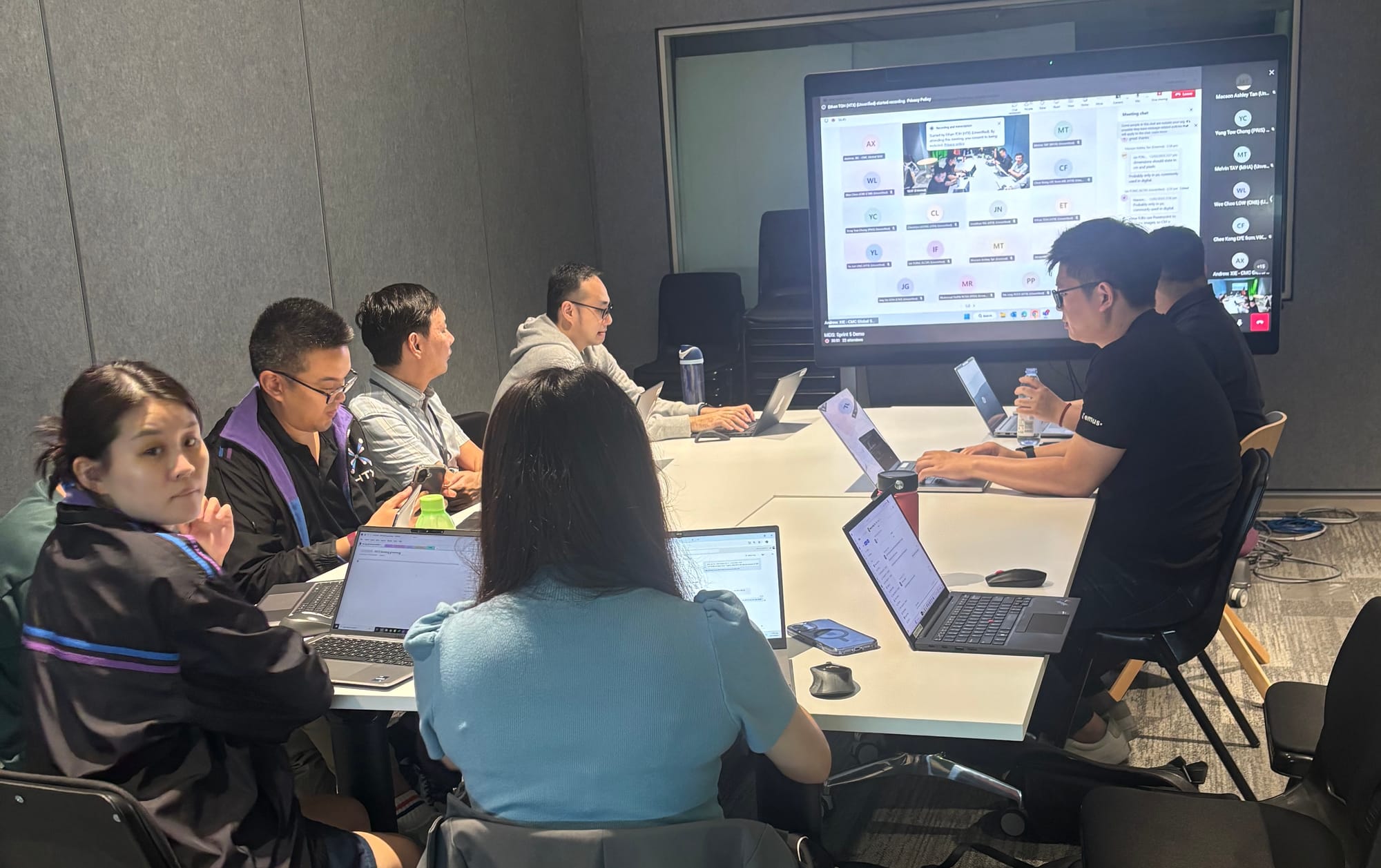
These sessions allow stakeholder representatives and system champions from each agency to experience actual developed features in action.
Since stakeholders are distributed across Singapore, our product and design teams run demos through Microsoft Teams, enabling real-time feedback and validation.
Our bi-weekly reviews maintain continuous stakeholder alignment. Each session creates space to address questions, refine functionality, and validate development progress—fostering collaboration while reducing the risk of misalignment.
Leading this enterprise UX transformation project taught me several valuable lessons:
Here's what I learned: People matter more than tech. Our Discovery Squad worked because we brought in the right experts at the right time. This helped us handle nine different agencies smoothly.
The bi-weekly demos weren't just updates - they built trust. When people saw their ideas come to life, they got excited and involved.
I also found that keeping everyone on the same page takes constant work. By running design and development side by side, we could use feedback right away. This kept us moving forward while staying focused on what users needed.
In the end, success wasn't just about making users happy. It was about bringing different groups together to build something that worked for everyone.